Microsoft Office 365 Features and Benefits
Access from anywhere with Office 365
Accessing your enterprise software over the Internet has some big advantages. For one, all you need is your computer — desktop, laptop, tablet, or phone — and an Internet connection or phone coverage. Because the software is running in a Microsoft data center, you simply connect to the Internet to access the software.
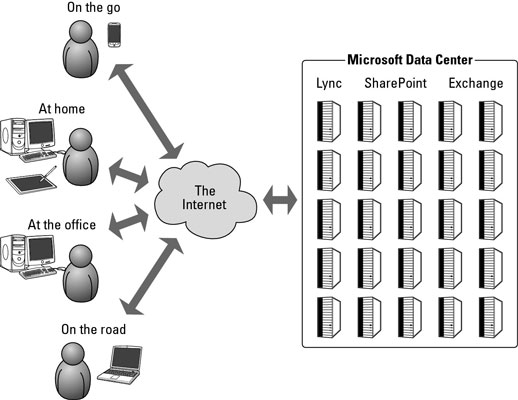
Another benefit of accessing centrally located data is that you always have a single source of the truth. If you make a change to a document from your tablet at home and then your colleague views the file from their phone, she will see the most up-to-date document. Gone are the days of e-mailing Excel documents between machines with long file names.
With SharePoint Online (part of the Office 365 package) a single file, say Forecast_Q1_2011.xlsx, lives out in the cloud (meaning in Microsoft’s globally distributed billion dollar data centers). Because the document lives in the cloud, the security permissions can be set up to allow anyone in the organization, regardless of geographic location, to view the document.
Security can be as strict or as lenient as desired. For example, you may want everyone in the organization to be able to see a company policy document but only want a select group of individuals to edit the document. In addition, SharePoint takes care of all the versioning and even lets you check out a document to edit so that nobody else can edit it at the same time.
Robust security and reliability comes with Office 365
With Microsoft taking on all the responsibility for security and reliability, your IT team can rest on their laurels. Letting Microsoft do the heavy lifting frees up the IT team to do more important things such as helping users get the most out of enterprise software.
Office 365 provides IT control and efficiency
IT personnel like to know exactly what everyone is doing with their systems at all times. If something goes wrong, then it is probably due to user error. Your systems do what they are supposed to do. Microsoft has gone out of its way to create an unprecedented level of control for administrators. But that is not all. Not only do administrators have control over the environment, but it is also actually designed to be simple in nature and intuitive.

No comments:
Post a Comment